Most small business owners do not need another app. They need more hours. Meta put it simply when it launched its new agent for small businesses on 29 September 2026: owners are "short on hours, not ideas". That is exactly the gap the biggest technology companies are now racing to fill.
In just over two weeks, Microsoft, OpenAI, Meta and Google each launched AI agents that keep working after you close the chat window. They take a goal rather than a single instruction, connect to the tools you already use, such as Shopify, QuickBooks, Stripe, Slack, Teams and Gmail, and carry tasks forward over hours or days. At the same time, Meta and Sierra announced an open standard for how personal AI agents should interact with businesses. AI agents for small business have moved from a conference buzzword to products you can switch on this month.
That creates two practical questions for owners and managers. First, which of these ready-made agents is useful for your business, and what should it be allowed to do? Second, as your customers start sending their own AI agents to your website, WhatsApp number or online store, is your business ready to deal with them? This guide answers both in plain language, with use cases, risks, realistic cost factors and a 30-day plan to get started.
At a Glance
- Microsoft: Copilot Autopilot, an agent with its own identity inside Microsoft 365.
- OpenAI: Dots, always-on ChatGPT agents that work with thousands of apps.
- Meta: Muse for Small Business, linked to Shopify, Stripe, QuickBooks and Meta ads, free with usage limits.
- Google: the Gemini agent, with per-agent identity and real-time spend caps.
- Meta and Sierra: the Personal Agent Protocol, a proposed standard for how customers' agents deal with businesses.
- What to do: start with one measurable task, connect agents through proper APIs with limited permissions, keep human approval for money and customer messages, and get your data ready for customers' agents.
The News: Five AI Agent Announcements in Two Weeks
Microsoft Copilot Autopilot: a digital teammate inside Microsoft 365
On 25 September 2026, Microsoft introduced a redesigned Copilot organised around Home, Code and Autopilot. Microsoft calls Autopilot "your digital teammate": you give it a name, a role and a goal, and it works on its own, including recurring tasks. It "lives in your tenant with its own identity, memory, computer and workspace", working inside Teams, Outlook and documents with "permissions, audit and governance behind it", and was due to enter private preview at the end of September. Code builds small apps, trackers and workflows from a plain-English description. Microsoft says Cowork, Code and Autopilot run on usage-based billing, so cost scales with the work the agents do.
OpenAI Dots: always-on agents in ChatGPT
At its DevDay conference on 29 September 2026, OpenAI launched Dots. According to SiliconANGLE, each Dot takes a goal, keeps working without step-by-step direction and runs on its own cloud computer that you can open to see what it is doing. Dots can be reached in ChatGPT, Slack and Microsoft Teams, and OpenAI says they can work with more than 4,000 apps through its plugins.
The safety design is worth noting. During "proactive research" a Dot's app connections are read-only, and actions that could touch your accounts first pass an automated check OpenAI calls "auto-review". In one early-tester example, the agent prepared an invoice and waited for approval before sending it. Dots are rolling out to ChatGPT Pro and Business Premium subscribers, with a beta for Enterprise workspaces. One agent is included, with more planned at prices OpenAI had not disclosed.
Meta Muse for Small Business: an agent connected to your store, books and ads
Also on 29 September, Meta expanded its Muse agent to small businesses. TechCrunch reports that Muse for Small Business plugs into tools such as Shopify, Stripe, Intuit QuickBooks, Canva, Klaviyo, Notion, Slack and Zoom, alongside Facebook Pages, Instagram professional analytics and Meta ad accounts. Meta says it learns what a business sells, how its brand sounds and what customers ask about most. It is free with usage limits, with a paid subscription for more usage. Several outlets report that Muse asks for the owner's approval before it publishes, sends or pays for anything.
Google Gemini agent: one agent for all work
At Gemini at Work on 9 October 2026, Google Cloud introduced the Gemini agent, describing it as "your new single, universal agent for work". Inside Google Workspace it can act as a personal assistant or as a "coworker agent" with its own company email address. Google connects it to Salesforce, ServiceNow, Slack, SAP, Workday and "any Model Context Protocol (MCP) server". Every agent gets its own identity, an Agent Gateway enforces company policies, and real-time spend caps set a hard limit on AI spend. Google did not publish pricing or a small-business tier.
Personal Agent Protocol: how customers' agents will talk to your business
The fifth announcement may matter most in the long run. On 6 October 2026, Sierra and Meta announced the Personal Agent Protocol, an open standard "open for anyone to implement" that defines how personal AI agents interact with businesses. Named partners include Shopify, Stripe, Walmart and Genesys. Customers decide what access their agents get, choosing read-only or write access, and companies set limits on what those agents can do. Businesses can offer agents their website, their APIs through standards such as MCP and OpenAPI, or their own AI agent. Sierra planned to publish a v0.1 specification in October 2026.
Put together, the message is clear. Agents are arriving on both sides of the counter: inside your business, doing work for your team, and outside it, acting for your customers. We covered the customer-side shift for online stores in our guide to agentic commerce and AI shopping agents.
What Are AI Agents for Small Business?
An AI agent is software that uses an AI model to work towards a goal by planning steps and using tools, such as reading email, searching a database, updating a CRM record or drafting an invoice, rather than just replying to a single message. AI agents for small business are agents set up to handle the routine, multi-step work that eats into a small team's day.
It helps to compare them with tools you may already use:
| Tool | What it does | Example |
|---|---|---|
| Rule-based automation | Follows fixed if-this-then-that rules you define | When a form is submitted, add the lead to a spreadsheet |
| AI chatbot | Answers questions in a conversation | Replies to "What are your opening hours?" on your website |
| AI agent | Takes a goal, plans steps, uses several tools and keeps going | "Follow up every unpaid invoice older than 30 days": checks the books, drafts reminders, waits for approval, sends and logs them |
The new "always-on" agents add three things that earlier assistants lacked: they keep running in the background, they remember context across days, and they increasingly have their own identity and permissions, much like a new employee's account. That last point is what makes them both powerful and risky.
Ready-Made Agents vs Custom AI Agents
For most small businesses, the first step is a ready-made agent from a platform you already pay for. A custom agent makes sense when the work depends on your own systems, data or customer channels that general-purpose agents cannot reach well.
| Factor | Ready-made agent (Dots, Muse, Autopilot, Gemini) | Custom AI agent |
|---|---|---|
| Best for | Email, documents, research, scheduling, marketing drafts, popular SaaS tools | Your CRM, ERP, inventory, booking engine, WhatsApp flows, industry-specific rules |
| Setup time | Hours to days | Weeks, depending on integrations |
| Cost model | Subscription or usage-based, set by the vendor | One-time build plus model usage and maintenance |
| Control over data | Follows the vendor's terms and regions | You choose hosting, model provider and data handling |
| Customer-facing use | Limited, mostly internal productivity | Can serve customers on your website, app or WhatsApp |
| Main risk | Broad permissions to many apps at once | Build quality, testing and upkeep |
A sensible pattern is to use both: a ready-made agent for internal office work, and a focused custom agent, or a well-built integration, for the one process that defines your business. If your systems are not connected today, our guide to fixing disconnected AI tools explains why integration usually matters more than the choice of model.
8 Practical Use Cases of AI Agents for Small Business
The best first projects are frequent, rules-heavy, easy to check and annoying for your team. Here are eight that fit most small and medium businesses:
- Lead follow-up. The agent reads new enquiries from your website, WhatsApp or email, enriches them, logs them in the CRM, drafts a personalised reply and schedules follow-ups. A person approves the first message.
- Invoice and payment reminders. It checks your accounting software for overdue invoices, drafts polite reminders in your tone and records responses. This is close to the invoice example OpenAI shared for Dots.
- Customer support triage. It answers common questions, looks up order status through a read-only API and hands complex or angry customers to a human with a summary. Our guide to AI customer service covers this in depth.
- WhatsApp sales and service. For businesses in India, WhatsApp is often the main channel. An agent can qualify leads, share catalogues and book appointments within Meta's rules. See our guide to WhatsApp AI agents.
- Marketing content and reporting. Muse and similar agents can draft posts, suggest ad changes and summarise performance from your ad accounts and store data, for you to review and publish.
- Inventory and order operations. It watches stock levels, flags slow movers, drafts purchase orders for approval and updates customers when orders are delayed.
- Back-office admin. Collecting documents from clients, filling standard forms, reconciling spreadsheets and preparing weekly summaries for the owner.
- Recruitment and HR basics. Screening applications against clear criteria, scheduling interviews and answering routine staff questions from your policy documents.
For each use case, write down how long the task takes today, how often it happens and what a mistake would cost. That gives you a baseline to judge whether the agent is worth it. Our business process automation guide for SMEs has a simple method for choosing processes.
How to Make Your Business Agent-Ready
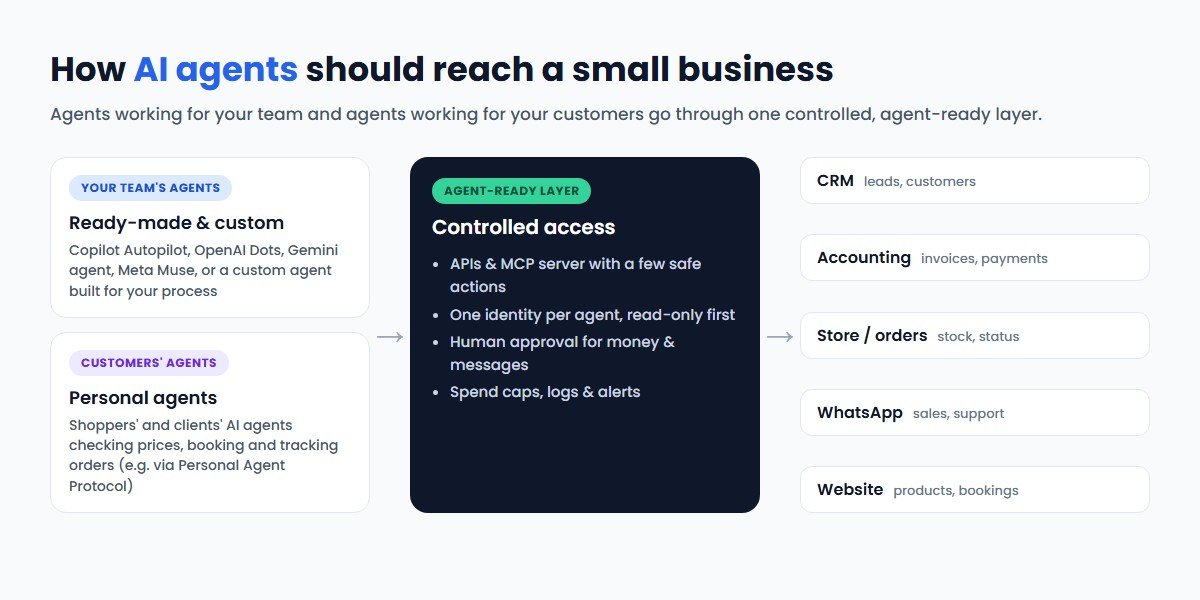
Whether the agent works for your team or for your customer, it can only be as good as the systems it can reach. Being "agent-ready" comes down to five steps:
1. Put your core data in systems with APIs
If customer details live in notebooks, personal phones and scattered spreadsheets, no agent can help reliably. Move leads and customers into a CRM, orders into a proper store or order system, and money into accounting software, all of which offer APIs. For many growing businesses, a custom CRM built around their own process is the foundation that everything else plugs into.
2. Expose a small set of safe actions
Instead of giving an agent full admin access, offer well-defined actions such as "get order status", "create quote" or "book appointment" through your own API or an MCP server. The Model Context Protocol is now supported by Google's Gemini agent and named in the Personal Agent Protocol, so a well-designed MCP server lets several different agents use your business safely.
3. Give each agent its own identity and limits
Microsoft, Google and OpenAI all now give agents their own identities. Follow the same principle in your own systems: one account per agent, read-only by default, write access only where needed, and spending limits on every AI provider account.
4. Keep a human approval step for consequential actions
Every major launch included approval checkpoints for actions like payments, publishing and messages to customers. Build the same into your workflows: the agent prepares, a person approves, the agent executes and logs.
5. Prepare for customers' agents
As standards like the Personal Agent Protocol mature, customers will increasingly ask their own agents to check your prices, book a slot or track an order. Clear product data, published policies, structured information on your website and a documented API make you easier to do business with. Our guide to AI search optimisation explains how structured content also helps you appear in AI answers.
Risks and Guardrails for AI Agents in a Small Business
Always-on agents with access to many apps carry real risks. The vendors' own safety features, such as read-only research modes, auto-review checks, approval steps and spend caps, show what the risks are:
- Over-broad permissions. Connecting an agent to email, accounts, store and ad accounts at once means one mistake or attack can reach everything. Connect only what the task needs.
- Prompt injection. Instructions hidden in an email, document or web page can try to redirect an agent. Treat external content as untrusted and limit what the agent can do even if it is fooled.
- Leaked API keys and runaway bills. Keys pasted into tools or code get stolen. Store them in a secrets manager and set hard spending limits.
- Data protection. Customer data shared with an agent is still your responsibility. Indian businesses should check obligations under the DPDP Act; see our DPDP Act compliance checklist.
- Availability and terms. New agent features often launch in selected countries, plans or previews first. Check what is available in your region and plan before building processes around it.
- Quality drift. OpenAI itself warns that agents "can still make mistakes". Review outputs regularly, especially in the first weeks.
Our detailed guide on AI agent security sets out eight controls and a checklist you can apply to any agent, ready-made or custom.
What AI Agents Cost a Small Business
There is no single price, and several of the new agents had not published full pricing at launch. Plan around these cost components instead:
- Platform plans. Ready-made agents sit inside subscriptions such as ChatGPT business plans, Microsoft 365 with Copilot or Google Workspace, or come free with usage limits, as Muse does. Extra agents and heavier use usually cost more.
- Usage-based charges. Microsoft bills Autopilot, Cowork and Code by usage, and most AI models are priced per amount of text processed. Long-running agents use more, so set budgets and caps from day one.
- Integration work. Connecting agents to your CRM, ERP, store or WhatsApp is often the largest one-time cost. It depends on how many systems are involved and whether they already have clean APIs.
- Custom agent development. A focused custom agent for one process is a smaller project than a full software product, but it still needs design, testing against real scenarios, security controls and monitoring. Effort grows with the number of tools, languages, channels and approval rules.
- Running and maintenance. Model updates, prompt tuning, logs review and fixes when connected apps change their APIs.
The main cost drivers are the number of connected systems, how much the agent is allowed to do on its own, data sensitivity and compliance needs, and the volume of work. For a breakdown of conversational AI budgets, see our AI chatbot development cost guide. Judge any agent by time saved, faster response and fewer errors against these costs, measured from a baseline, rather than by vendor promises.
A 30-Day Plan to Get Started
- Week 1: Pick one process. List repetitive tasks, choose one that is frequent, easy to check and low-risk if wrong, and measure how long it takes today.
- Week 2: Try a ready-made agent. Use the agent in a platform you already pay for, connect only the tools the task needs, keep it read-only and review every output.
- Week 3: Add guardrails and approvals. Give the agent its own account, set spend limits, define what it may do alone and what needs approval, and turn on logging.
- Week 4: Measure and decide. Compare results with your baseline. If the agent cannot reach the systems or data the job needs, that is the signal to invest in integration or a custom agent.
In parallel, start your agent-ready groundwork: clean up customer data, connect your core systems and document the actions you would be comfortable letting a customer's agent take.
Conclusion
The late-September and early-October 2026 launches mark a turning point. Microsoft, OpenAI, Meta and Google now all offer agents that work in the background, connect to everyday business tools and carry their own identities and permissions, and the industry has started to agree on how customers' agents should interact with businesses. For smaller firms, that brings capabilities once reserved for companies with large operations teams.
The winners will not be the businesses that switch on every agent first. They will be the ones that start with a clear, measurable task, connect agents to well-organised systems through safe APIs, keep people in charge of decisions that matter, and prepare their data and services for customers' agents. Approached that way, AI agents for small business can give owners back the one thing Meta says they are short of: hours.
Frequently Asked Questions
What are AI agents for small business?
They are AI systems that work towards a goal by planning steps and using tools such as email, CRM, accounting and store software, rather than just answering questions. Small businesses use them for lead follow-up, invoice reminders, support triage, marketing drafts and back-office admin, usually with a person approving important actions.
What is OpenAI Dots?
Dots are always-on AI agents that OpenAI launched in ChatGPT on 29 September 2026. Each runs on its own cloud computer, keeps working towards a goal and can be reached in ChatGPT, Slack and Teams.
What is Meta Muse for Small Business?
It is Meta's AI agent for small businesses. It connects to tools such as Shopify, Stripe and QuickBooks plus Meta's ad and page tools, and is free with usage limits.
Do I need a custom AI agent?
Ready-made agents usually cover office productivity. A custom AI agent makes sense when the work depends on your own CRM, ERP, inventory or WhatsApp flows, when you need control over data and hosting, or when the agent will serve customers directly.
Are AI agents safe for a small business to use?
They can be, with guardrails: connect only the tools a task needs, start read-only, give each agent its own account, protect API keys, set spending limits and require human approval for payments and customer messages.
How can CodeBase Coders help my small business with AI agents?
CodeBase Coders helps small and growing businesses pick the right first agent use case, connect ready-made agents such as ChatGPT, Copilot, Gemini or Muse to their tools safely, and build custom AI agents when the work depends on their own CRM, ERP, WhatsApp, website or database. We also build the APIs and MCP servers that make a business agent-ready. Explore our AI agent development, AI integration services, AI chatbot development and custom CRM development, or book a free consultation.
Sources
- Microsoft (25 September 2026): Introducing the new Copilot with Home, Code and Autopilot
- SiliconANGLE (29 September 2026): OpenAI launches Dots, always-on AI agents in ChatGPT with their own cloud computers
- TechCrunch (29 September 2026): Meta is expanding its AI agent Muse to small businesses
- Google Cloud (9 October 2026): Gemini at Work 2026: Introducing Gemini agent
- Sierra (6 October 2026): Introducing Personal Agent Protocol
Work With CodeBase Coders
CodeBase Coders helps businesses turn ideas into scalable digital products and improve existing processes through software, automation, AI, integrations and modern web technologies. For AI agents, we help small and growing businesses choose the right first use case, connect ready-made agents to their tools safely, build custom agents for their CRM, ERP, store and WhatsApp, and create the APIs and MCP servers that make a business agent-ready.
- AI Agent Development
- AI Integration Services
- AI Chatbot Development
- AI Copilot Development
- AI Consulting
- Custom CRM Development
- Software & API Integration Services
Want an AI agent that saves your team real hours? Book a free consultation with CodeBase Coders and we will help you pick the right first process, connect it safely and measure the results.
Rohan Verma
Founder, CodeBase CodersRohan Verma is the founder of CodeBase Coders. He helps startups, SMEs and enterprises turn ideas into scalable digital products and improve business processes through custom software, AI, automation, integrations and modern web technologies.